Skip to content
Espectro Soluções
Ad sales tracking

See which ad made a profit.

Espectro brings together your checkout sales and your Meta ad spend, and shows profit, ROAS and CPA per campaign.

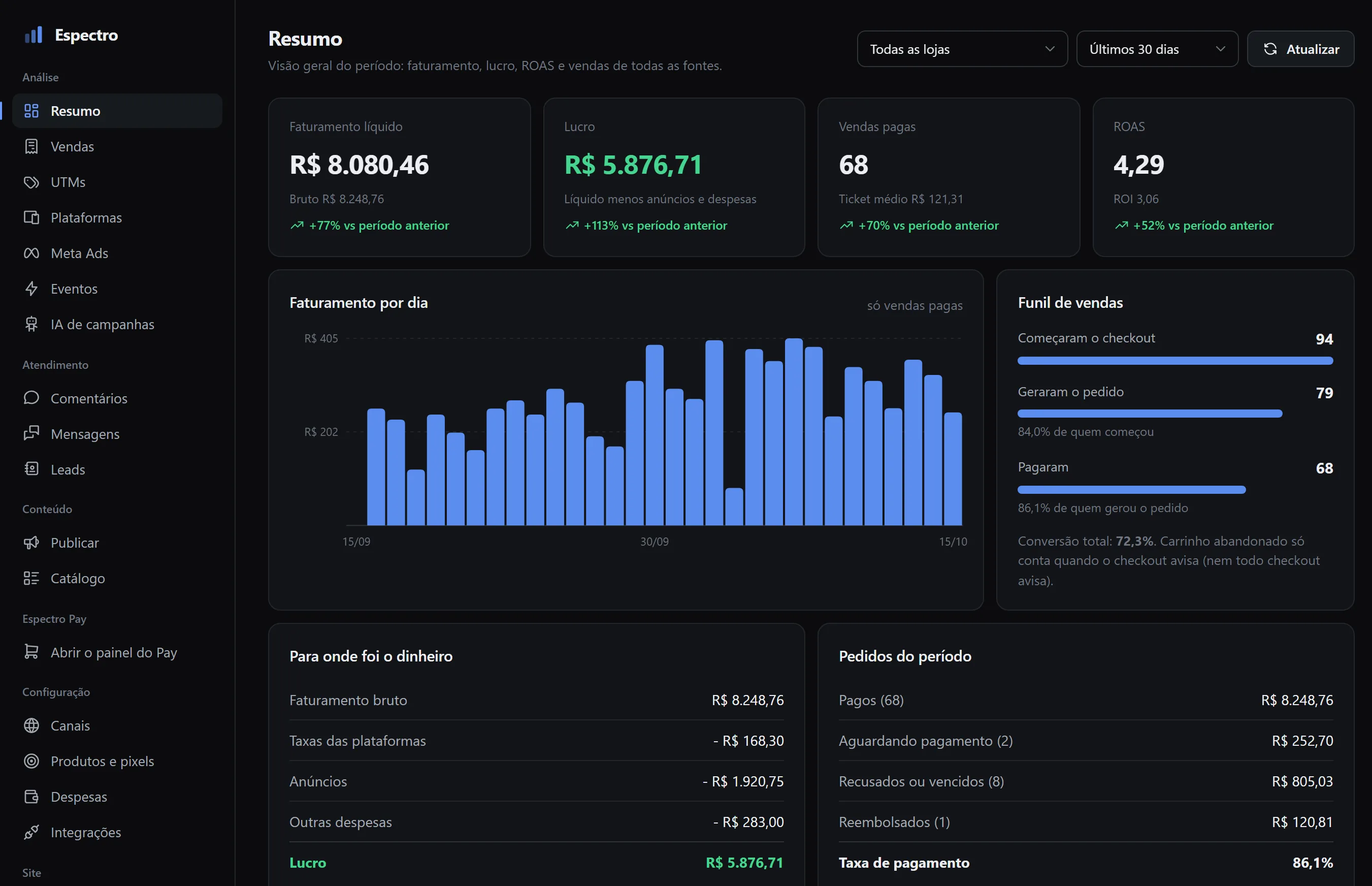
Espectro summary screen with net revenue, profit, paid sales, a chart of revenue per day, the sales funnel and where the money went.
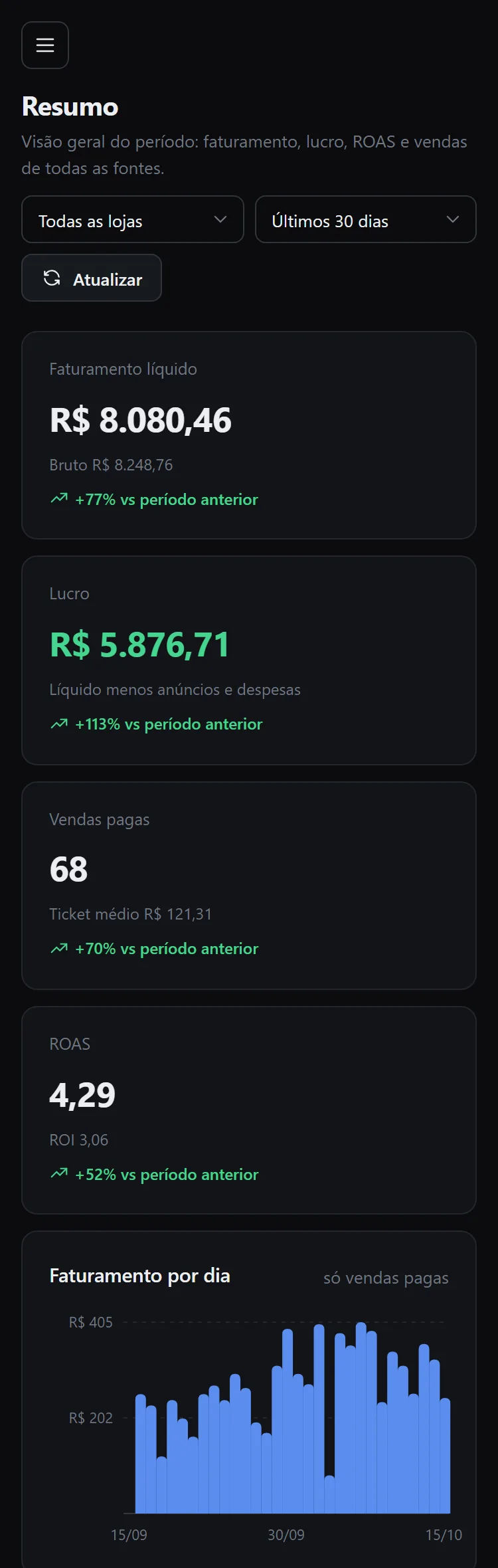
The same Espectro summary on a phone.
Espectro screen, sample data

From the ad click to the payment.

Tracking, PIX checkout and, soon, AI-assisted campaign management. Each solution works on its own or together with the others.

Espectro

Sales tracking. It receives sales from any checkout, matches them with the UTMs and the ad spend, and shows which campaigns are profitable.

  • Revenue
  • Profit
  • ROAS
  • CPA
  • Sales funnel
  • Campaigns that sell

Sends purchases to Meta from the server through the Conversions API, with one pixel per product.

Espectro panel showing gross revenue, platform fees, ads, other expenses and profit.
Espectro screen, sample data

Espectro Pay

A checkout of our own with PIX, in two steps and designed for mobile.

Espectro Pay checkout on a phone, with the order summary.

AI management Coming soon

The AI reviews your campaigns and suggests adjustments. A person approves before anything changes.

How Espectro tracks a sale

From the ad to the paid purchase, each sale arrives with the campaign, ad set and ad the person came from.

  1. One line on your pages

    The Espectro script goes in the <head> of the sales page and of the checkout. It stores the UTMs and the ad click and fires the product's Meta pixel.

  2. Sales arrive by webhook

    Each checkout gets its own address and token. Espectro Pay and Zedy already connect, and each order arrives together with its UTMs.

  3. Spend comes from Meta

    Connect your ad account to bring in spend, campaigns, ad sets and ads. Product and operating costs are entered by you in the dashboard.

  4. The purchase goes to Meta from the server

    When an order is paid, Espectro sends the purchase to the product's pixel through the Conversions API, with the same identifier used in the browser. That way Meta does not count the sale twice.

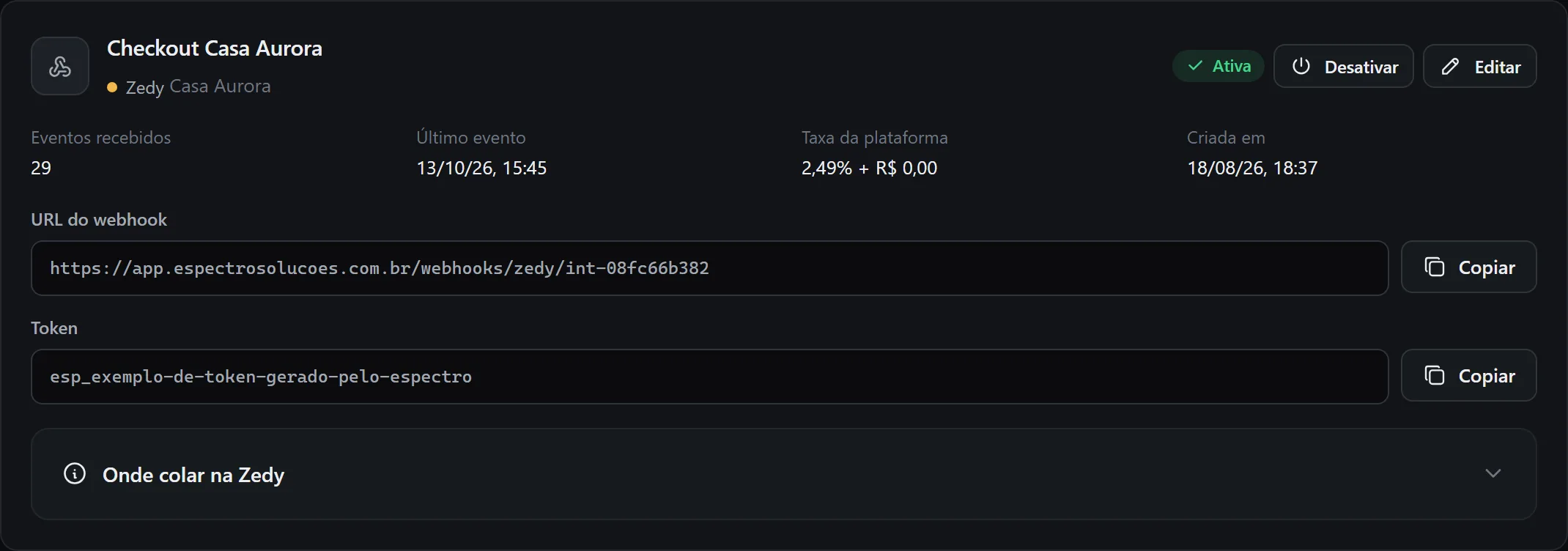
A checkout integration in Espectro, with the webhook address, the token and the number of events received.
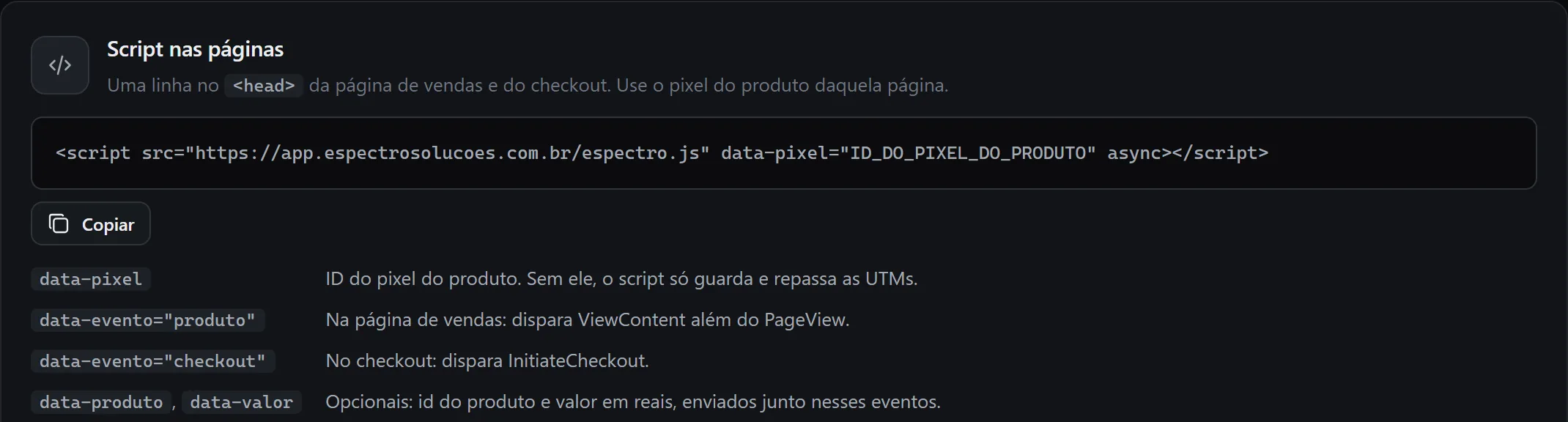
The Espectro script for your pages, with the line to copy and the product pixel attributes.
Espectro screen, sample data

In the dashboard: revenue, profit after fees, ads and expenses, ROAS, CPA, the sales funnel and sales by campaign, ad set, ad and placement.

For people who advertise on Meta and sell online

E-commerce and dropshipping stores

  • Profit per product and per campaign, already net of the platform fee, the ads and the expenses you enter.
  • Several stores and checkouts in the same dashboard, with a filter by store.
  • PIX checkout with Espectro Pay, or the checkout you already use.

Digital product creators

  • Which creatives and placements bring in sales, through the UTMs of each ad.
  • One pixel per product, so Meta does not mix the audience of one product with another's.
  • Checkout funnel: who started, who placed the order and who paid.

Today Espectro receives sales from Espectro Pay and Zedy. If you sell through another platform, tell us which one in the form.

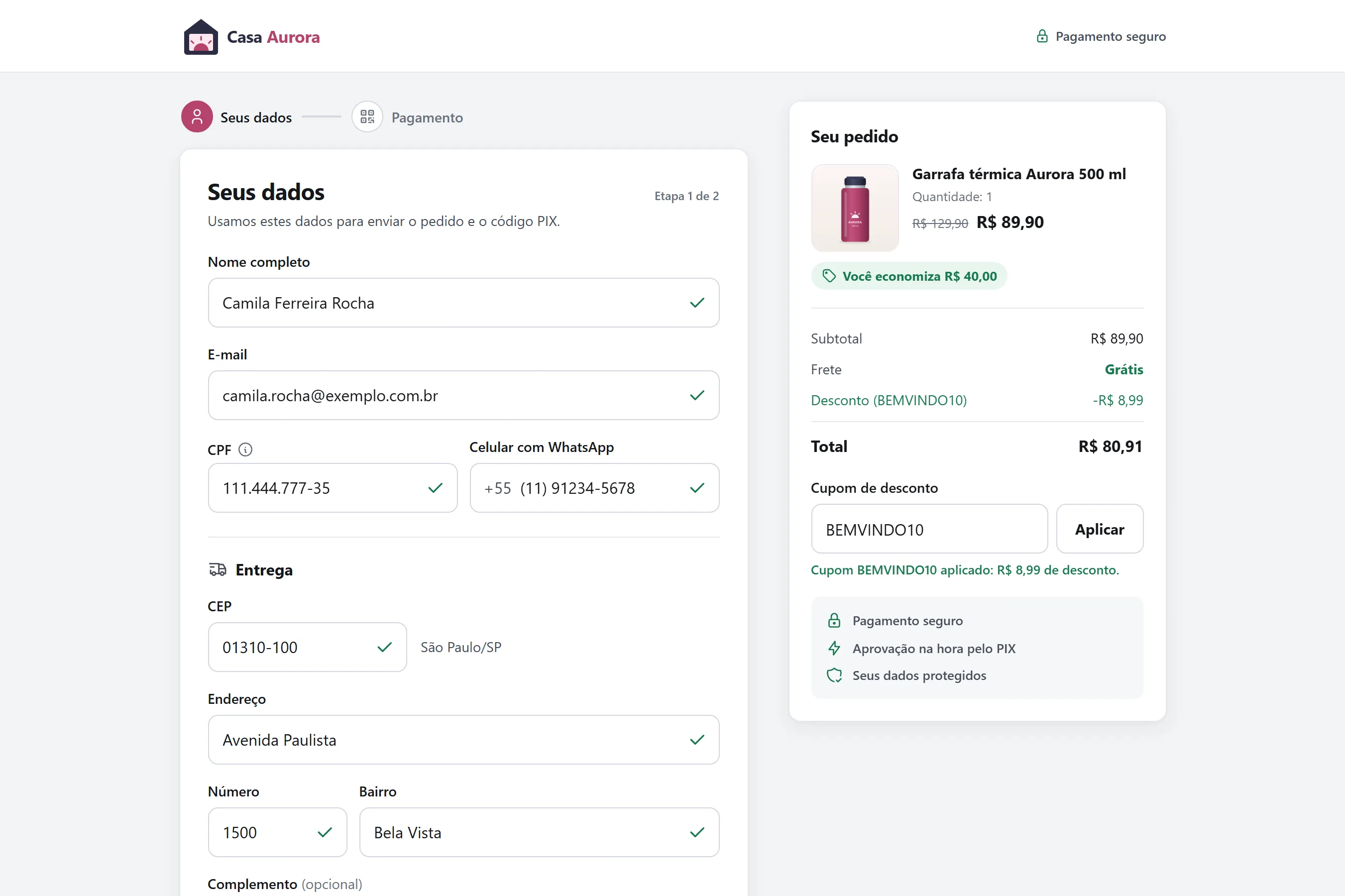
First step of the Espectro Pay checkout on a computer: customer details, delivery and the order summary with a coupon applied.
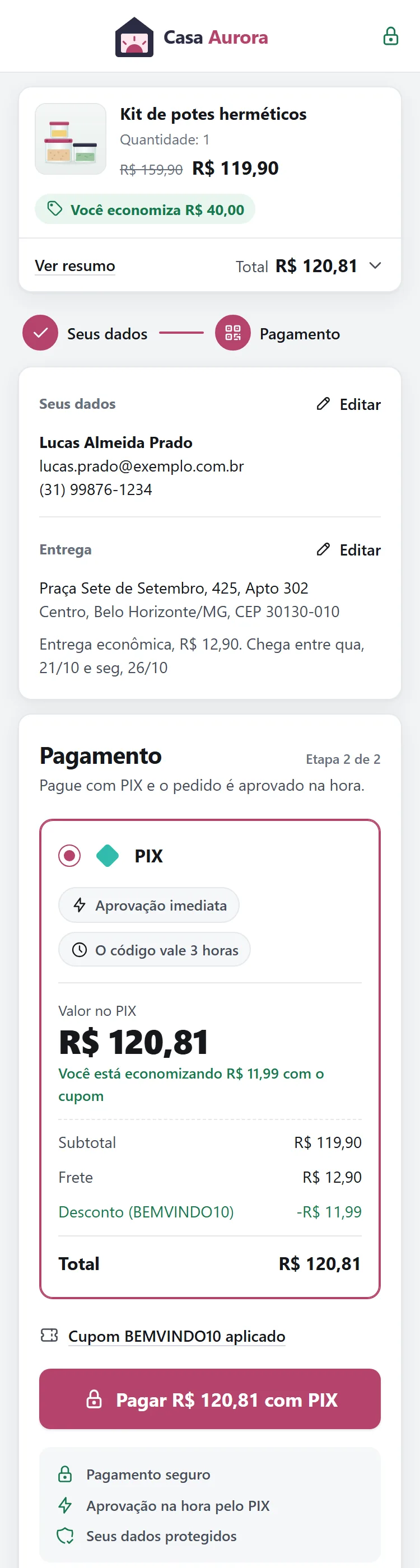
Second step of the Espectro Pay checkout on a phone: PIX payment, shipping and the coupon discount.
Espectro Pay checkout, sample data

Espectro Pay: a PIX checkout built for mobile

PIX is Brazil's instant payment system. The buyer fills in their details in one step and pays in the next. Anyone who does not pay gets a reminder to come back.

Two steps

Details and delivery in one step, payment in the other.

PIX

QR code and copy-and-paste code, with the payment confirmed on screen.

Delivery estimate

Each shipping option shows the price and the dates the order should arrive.

Coupons

Percentage or fixed-amount discounts, with a usage limit and an expiry date.

Recovery

Expired PIX payments and abandoned carts get an email with a coupon to complete the purchase.

Store emails

A thank-you message in the store's name as soon as the payment is confirmed.

Webhooks

The store's systems are notified when the order is created, the PIX is generated, the payment comes in, the PIX expires or the cart is abandoned.

Coming soon

AI-assisted campaign management

The AI will read your campaign numbers in Espectro and suggest adjustments, such as pausing an ad or changing a budget. Nothing changes in your account unless a person approves it.

  • Reviews campaigns, ad sets and ads
  • You approve every change
  • Your data does not train models

Talk to us

Tell us what you sell, where you advertise and which checkout you use today. The reply goes to your email.

  • We use this information only to reply. See the privacy policy.
  • Want to know when AI management opens? Choose that topic in the form.

What you sell, where you advertise and what you want to solve.

By sending, you agree to the privacy policy.